

CI/CD Pipeline Using GitHub Actions for ASP.NET Core (Beginner to Advanced)

Modern software development demands automation. CI/CD pipelines ensure your ASP.NET Core applications are built, tested, and deployed automatically without manual effort.
In this tutorial, you’ll learn how to build a production-ready CI/CD pipeline using GitHub Actions.
👉 If you deploy manually to Azure/IIS, read this first:
Host ASP.NET Core App on IIS – Complete Deployment Guide
https://www.connectedprogrammer.com/host-asp-net-core-8-application-on-iis-complete-deployment-guide-2025-tutorial/
Why Use GitHub Actions for ASP.NET Core CI/CD?
✔ Native GitHub integration
✔ Free for public repos
✔ YAML-based configuration
✔ Supports .NET 8
✔ Easy Azure, IIS, Docker deployment
✔ Industry standard DevOps tool
🧱 Step 1: Project Prerequisites
You need:
- ASP.NET Core project
- GitHub repository
- .NET 8 SDK
- Basic Git knowledge
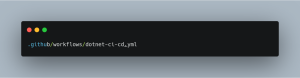
🧩 Step 2: Create GitHub Actions Workflow
Create file:
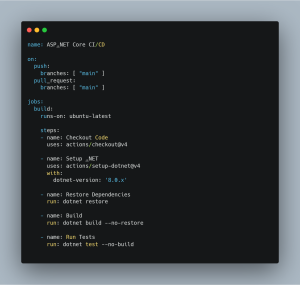
🛠️ Step 3: CI Pipeline (Build & Test)
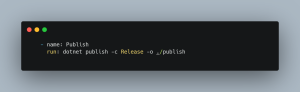
🚀 Step 4: Publish Application
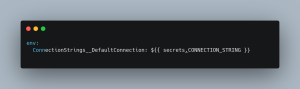
🔐 Step 5: Use GitHub Secrets
Go to:
Repo → Settings → Secrets → Actions
Add:
- AZURE_WEBAPP_PUBLISH_PROFILE
- CONNECTION_STRING
Use in workflow:
Deploy ASP.NET Core App Using GitHub Actions
Example (Azure App Service):
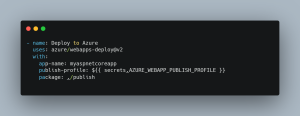
- ci cd pipeline asp.net core
- github actions asp.net core
- asp.net core devops tutorial
- automate deployment dotnet
- github actions yaml dotnet
- asp.net core continuous deployment
❓ FAQ
Q1: Is GitHub Actions free?
✔ Yes (limited minutes).
Q2: Can I deploy to IIS?
✔ Yes (self-hosted runner).
Q3: Is this production ready?
✔ Absolutely.